- TECH4SSD
- Posts
- How to Turn Your Selfies into GTA V Characters Using AI (Step-by-Step Guide)
How to Turn Your Selfies into GTA V Characters Using AI (Step-by-Step Guide)
TΞCH⁴SSD SSD™
March 13, 2026
In partnership with

Imagine seeing yourself, or even your friends, as a character straight out of Grand Theft Auto V. Not just any character, but you, with your features, your style, perfectly rendered in the iconic Rockstar Games aesthetic. Sounds like something that would require complex 3D modeling or advanced graphic design skills, right? Wrong.
Thanks to the incredible advancements in AI, you can now transform your ordinary selfies into stunning GTA V-style character renders in mere seconds, with zero editing skills required. This isn't just a fun trick; it's a testament to how accessible powerful AI tools like Google Gemini and Grok have become, allowing anyone to tap into their creative potential and generate viral content.
The Magic Behind the Transformation: AI's Artistic Eye
How does this work? It's all about how AI interprets and reimagines your image. When you feed your selfie into a sophisticated AI model like Gemini or Grok, it doesn't just apply a filter. Instead, it analyzes your facial structure, clothing, and overall pose, then uses its vast understanding of the GTA V art style to recreate you within that universe. It adds the signature illustrative touches, enhances shadows, and even integrates details like your gold chain, making it look like you just walked straight out of Rockstar Games.
This process is incredibly fast and surprisingly accurate, offering a level of detail and consistency that would typically take hours for a human artist to achieve.
Step-by-Step Guide: GTA V Yourself in 30 Seconds
Ready to see yourself cruising through Los Santos? Here’s how you can turn your selfie into a GTA V character using free AI tools:
Step 1: Pick Your Perfect Selfie
First, find a clean photo of yourself. The key here is clarity. A good selfie for this process should have:
•Clear Face: Your face should be well-lit and fully visible.
•Good Lighting: Avoid harsh shadows or overexposed areas that obscure details.
•Simple Background (Optional but Recommended): While AI is smart, a less cluttered background can sometimes lead to cleaner results.
Any angle works, but a straightforward portrait or a full-body shot with a clear pose often yields the best initial results.
Step 2: Head to Your AI Powerhouse
Open your preferred AI image generation tool. For this hack, we recommend Google Gemini or Grok, as they offer robust image understanding and generation capabilities that work perfectly for this transformation.
Step 3: Upload Your Selfie
Once you're in Gemini or Grok, upload your chosen selfie. This will serve as the reference image for the AI to base its transformation on.
Step 4: Paste the Magic Prompt
This is where the real magic happens. The prompt guides the AI on how to transform your image. Here’s a general prompt structure you can use and adapt:
Plain Text
Using the uploaded reference photo as the exact face, skin tone, hairstyle, expression and identity, create a full-body realistic 3D character in the authentic GTA V RAGE engine style. Complete the body naturally with legs, feet and realistic sneakers. Natural confident standing pose with subtle contrapposto. Match GTA V in-game visuals: slightly gritty realistic textures, detailed skin with pores, real fabric clothing with natural folds and weight, accurate logos. Bright Los Santos outdoor daylight with strong highlights, deep shadows and cinematic contrast. High-quality in-game screenshot look, full-body composition.
Pro Tip: You can customize this prompt further. For example, if you want a specific outfit, add it to the prompt: ...wearing a leather jacket and ripped jeans...
Step 5: Hit Generate and Watch it Cook!
Click the
Generate button and watch the AI work its magic. In just a few seconds, you’ll see your selfie transformed into a stunning GTA V character render.
Step 6: Refine and Regenerate (Optional)
Not quite perfect? That’s the beauty of AI! You can:
•Regenerate: If the first attempt isn't exactly what you envisioned, simply hit generate again. The AI will produce a new variation.
•Adjust the Prompt: Experiment with your prompt. Want a night scene? Add night mode or neon lights to your prompt. Different outfits? Describe them. Action poses? jumping in the air or holding a weapon.
This iterative process allows you to fine-tune the output until you have the perfect GTA V version of yourself.
Before and After: See the Transformation
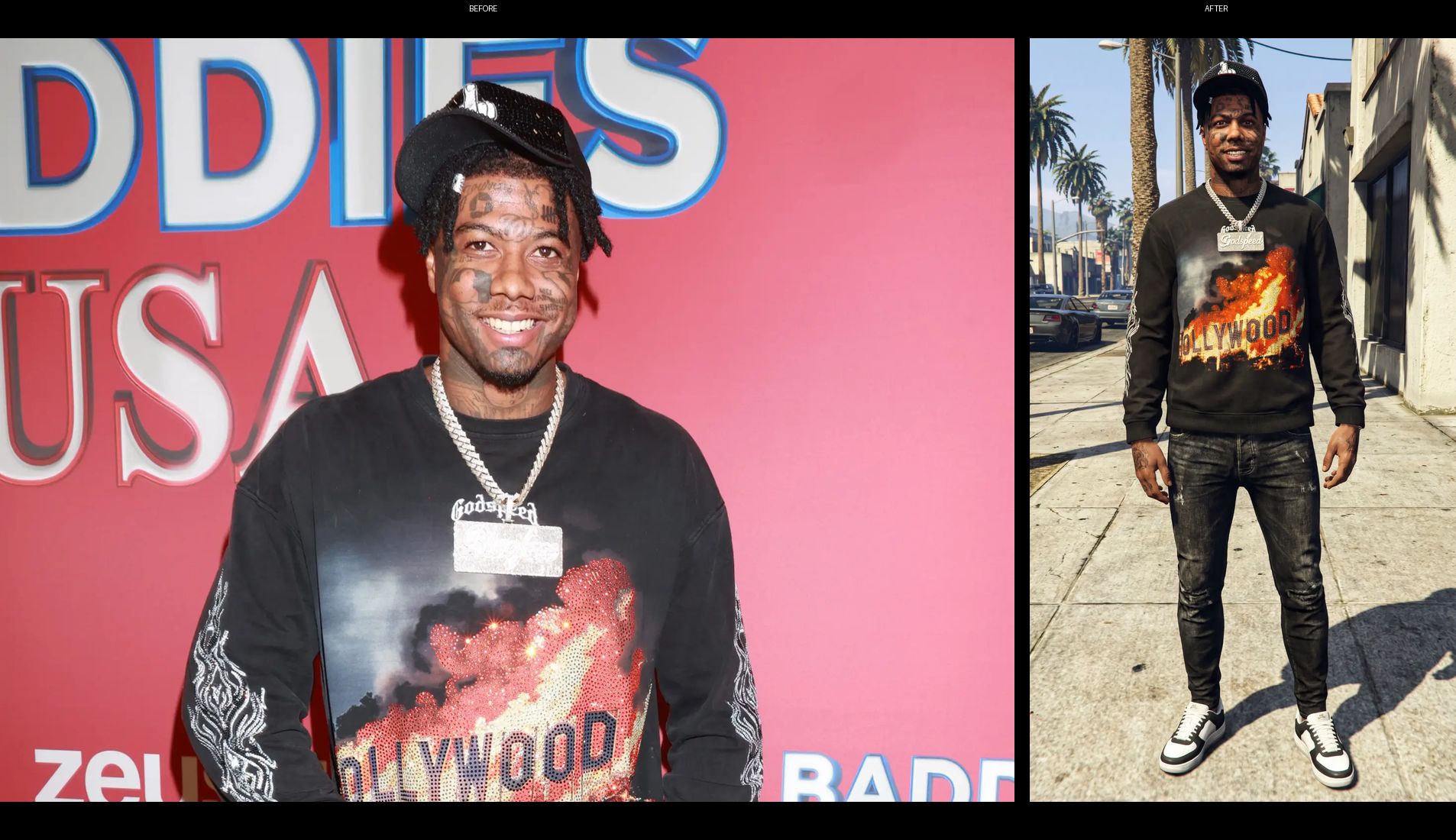
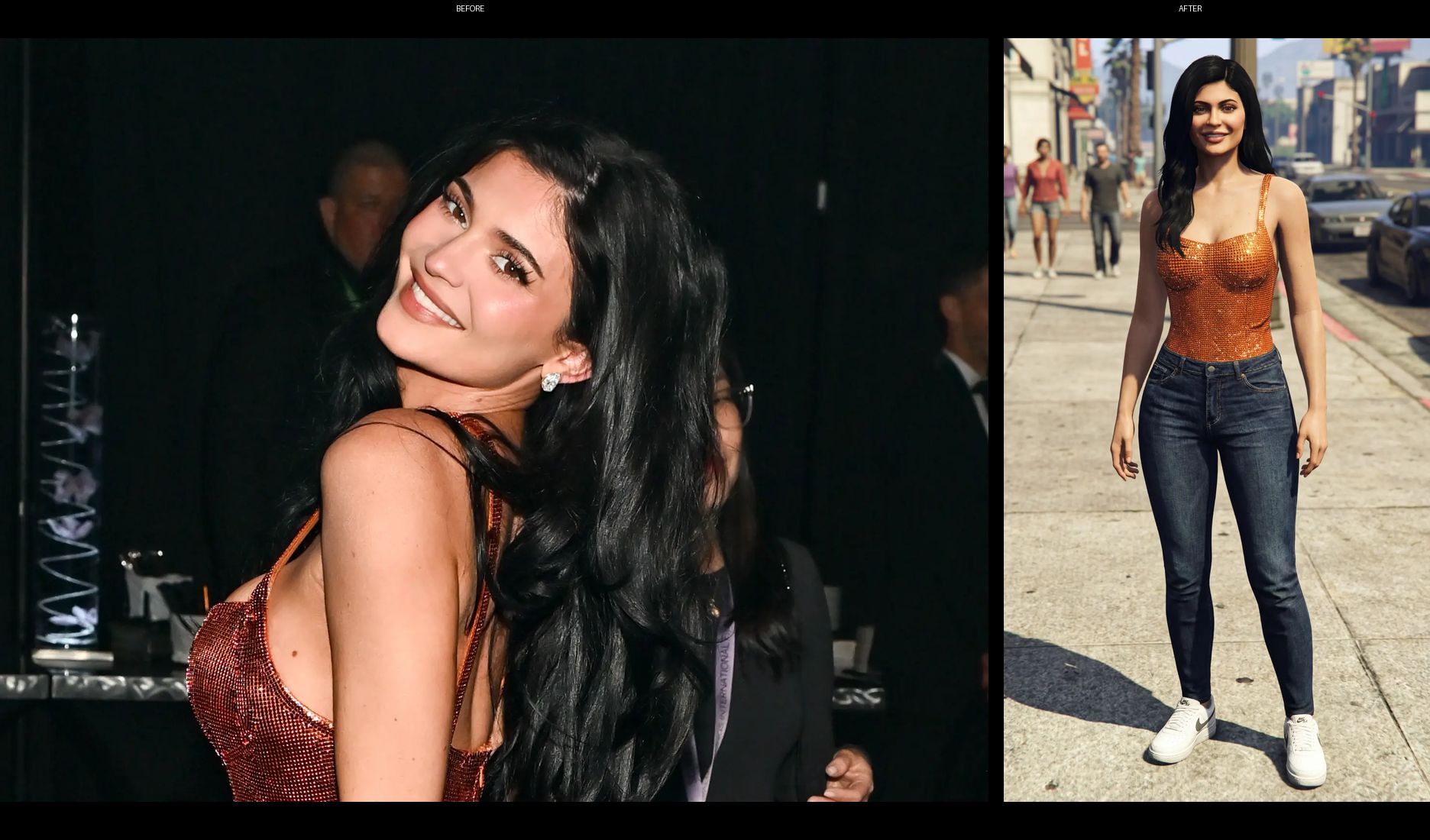
To truly appreciate the power of this AI hack, let's look at some incredible before-and-after transformations. Notice how the AI not only captures the likeness but also injects the distinct GTA V aesthetic, adding details like realistic shadows, textures, and even environmental context.
Want to get the most out of ChatGPT?

ChatGPT is a superpower if you know how to use it correctly.
Discover how HubSpot's guide to AI can elevate both your productivity and creativity to get more things done.
Learn to automate tasks, enhance decision-making, and foster innovation with the power of AI.
Plain Text
Using the uploaded reference photo as the exact face, skin tone, hairstyle, expression and identity, create a full-body realistic 3D character in the authentic GTA V RAGE engine style. Complete the body naturally with legs, feet and realistic sneakers. Natural confident standing pose with subtle contrapposto. Match GTA V in-game visuals: slightly gritty realistic textures, detailed skin with pores, real fabric clothing with natural folds and weight, accurate logos. Bright Los Santos outdoor daylight with strong highlights, deep shadows and cinematic contrast. High-quality in-game screenshot look, full-body composition.
1.Hit Generate: Watch it cook! Legs added. Shadows pop. Your gold chain stays. Now it looks like you just walked straight out of Rockstar Games.
Before and After: See the Transformation
To truly appreciate the power of this AI hack, let's look at some incredible before-and-after transformations. Notice how the AI not only captures the likeness but also injects the distinct GTA V aesthetic, adding details like realistic shadows, textures, and even environmental context.
Example 1: Elon Musk
Witness the transformation of a familiar face into a Los Santos resident.

Example 2: Blueface
From a real-world image to a character ready for a mission.
Example 3: Kylie Jenner
See how a celebrity selfie is reimagined in the GTA V universe.
Practical Tips for Best Results
To get the most out of this AI hack, keep these tips in mind:
•Maintain Clean Lighting: The cleaner and more even the lighting in your original selfie, the better the AI can interpret your features and apply the GTA V style.
•Visible Face: Ensure your face is clearly visible and not obscured by shadows, hair, or accessories.
•Experiment with Prompts: Don't be afraid to try different descriptive words in your prompt. The more specific you are, the better the AI can match your vision.
•Iterate, Don't Aim for Perfection: AI generation is often an iterative process. If the first result isn't perfect, tweak your prompt or regenerate. Each attempt can bring you closer to your desired outcome.
Conclusion: Your Los Santos Adventure Awaits!
This AI hack is more than just a fun novelty; it's a powerful demonstration of how accessible and versatile AI image generation has become. In just a few seconds, you can transport yourself into the vibrant, gritty world of Grand Theft Auto V, creating unique and shareable content that's sure to turn heads.
So, what are you waiting for? Grab your best selfie, head over to Gemini or Grok, and start your Los Santos adventure today. The streets of Blaine County are calling!
For more cutting-edge AI tips and tricks, visit Tech4SSD.net for the full prompt library and exclusive content.
🔥 YOU MAY ALSO LIKE
Unlock Your Creative Flow with Luma Agents
Tired of juggling a dozen apps? Luma Agents is the first Agentic Workspace that orchestrates your entire creative workflow autonomously. Stop context switching and start creating!
Reply